AYD Simply Returns
In Development Shopify Public App

Self-service returns, handled end to end.

Customers request a return from your own storefront. You approve it. Royal Mail labels, branding, custom return reasons and reporting are already taken care of.

The problem

Returns shouldn't be this much work

Customers email to ask how

Without a self-serve flow, every return starts with a support email instead of a straightforward request.

A separate returns site

Most returns tools redirect customers off your storefront entirely, breaking the experience you've built.

Postage labels, one at a time

Manually creating and emailing a return label for every request eats into time you don't have.

No visibility into why

Return reasons buried in email threads instead of data you can actually search, filter and act on.

Return reasons that don't match your systems

Shopify only lets customers pick from its own built-in return reasons, so what they see rarely lines up with the RMA codes your warehouse or ERP already runs on.

How it works

Everything a returns flow needs, built in

Match every reason to your own RMA code.

Write your own customer-facing return reasons and map each one straight to the RMA code your warehouse or ERP system already uses, instead of forcing Shopify's built-in reasons into a system they were never built for.

  • Write return reasons in your own words, not Shopify's defaults
  • Map each reason to the RMA code your ERP already recognises
  • Keep the returns workflow your warehouse already runs on
Arrived damagedRMA-104
Wrong item sentRMA-091
Changed my mindRMA-002

Built into your storefront.

Add AYD Simply Returns as a theme app block and keep the entire returns experience on your own domain. No redirects, no separate returns site, and your store's header and footer stay in place.

  • No separate returns site to send customers to
  • Eligible orders surface first, automatically
  • Only shows returns that meet your Shopify return rules
  • Add it from the theme editor, no code required
Theme app block No redirect Order search
A customer's orders in the storefront returns widget, with a Start a return button on each eligible item.

Royal Mail labels, without the printer.

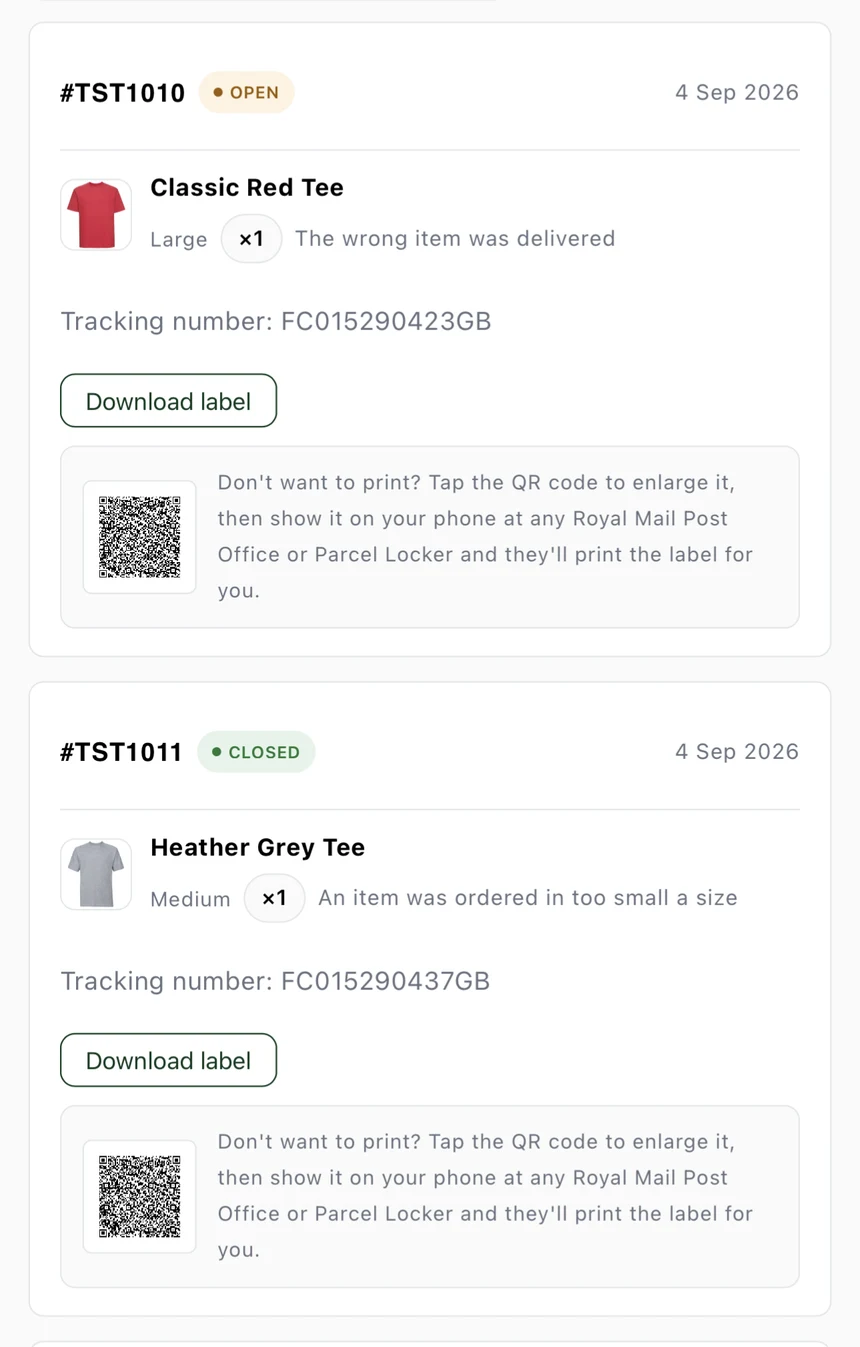
Approve a return and AYD Simply Returns automatically generates the Royal Mail return label and sends it to the customer by email. No printer? They can use the QR code at a Royal Mail branch instead.

  • Royal Mail labels generated automatically on approval
  • No printer? Use the QR code at a Royal Mail branch
  • Live return status & tracking in the customer portal
Royal Mail labels QR returns Live tracking
Two return requests showing a downloadable Royal Mail label and a QR code fallback for customers without a printer.

Make it look like your store.

Customise buttons, borders, text and every return-status pill to match your brand, with a live preview as you edit, so the returns experience feels like a natural part of your storefront.

  • Full colour control, no CSS required
  • Give every return status its own colour
  • See changes update instantly as you edit
Brand colours Status pills Live preview
The return status colour customisation screen, showing background and text colours for each return status.

Every return, one dashboard.

Manage every return request in one place. Search, sort and filter by order, product, reason or value, then export exactly what you need to CSV, whenever you need it.

  • Sort by date, product, quantity or value
  • Export a CSV matching your current filters
  • Schedule automated reports at a chosen day and time
Smart filtering CSV export Automated scheduled reports
Return, item and value totals for the selected period. A filterable, sortable table of individual return requests with CSV export.

Getting started

Live in a few minutes

1

Install the app

Install AYD Simply Returns on your store from the Shopify App Store.

2

Add the block

Add it to your theme from the Shopify Theme Customizer, no code required.

3

Set up your reasons

Create the return reasons and RMA codes your team already uses.

4

Connect Royal Mail

Connect your Royal Mail account so approved returns get a label and QR code automatically.

5

You're live

Customers can request returns from your storefront, and every request shows up in Shopify Admin and your Reports.

Pricing

Plans that scale with return volume

Every plan starts with a 7-day free trial (up to 10 returns), no card charged until you choose to continue.

Starter

$30/mo

100 returns / month

Growth

$60/mo

200 returns / month

Pro

$100/mo

300 returns / month

Enterprise

$200/mo

1,000 returns / month

Every plan includes: custom return reasons & RMA codes, automatic Royal Mail labels & QR codes, full brand customisation, CSV & scheduled reports, and the storefront theme block. Need more than Enterprise covers? Get in touch.

FAQ

Common questions

Yes. The returns widget is added as a Theme App Extension block, so it works with any Online Store 2.0 theme without editing theme code. Add it from Theme Customizer like any other section.
Every Royal Mail label email also includes a QR code, which the customer can show at a Royal Mail Post Office or parcel locker to have the label printed for them there.
Yes. You write the customer-facing wording for each reason and map it to a Shopify return category, plus an optional RMA code that matches whatever your warehouse or ERP system already uses.
No. The whole flow runs inside your own storefront through the theme app block, so your header, footer and domain never change, and you can style it to match your brand.
Royal Mail is supported today. More courier integrations are on the roadmap, so if there's a specific one you need, let us know at the support email below.
You can upgrade to a higher plan at any time from the Subscription page in the app. Your usage resets at the start of each calendar month.

Ready to take returns off your plate?

For setup help, bug reports, feature requests or early access, email [email protected]. It's checked directly, no support tickets or bots in between.